
How to Set Up Embedded Editing
Embed the PandaDoc editor in your application so users can create and edit documents and templates without leaving your platform.
Problem
You want your users (Revenue Ops, HR Ops, or other internal teams) to create and edit PandaDoc documents and templates directly inside your application, without switching to the PandaDoc app. Embedded Editing uses the PandaDoc Editor in full mode -- all fields, content blocks, and signer configuration.
Prerequisites
- Your organization is a PandaDoc client
- The end user's browser supports
postMessage
Solution
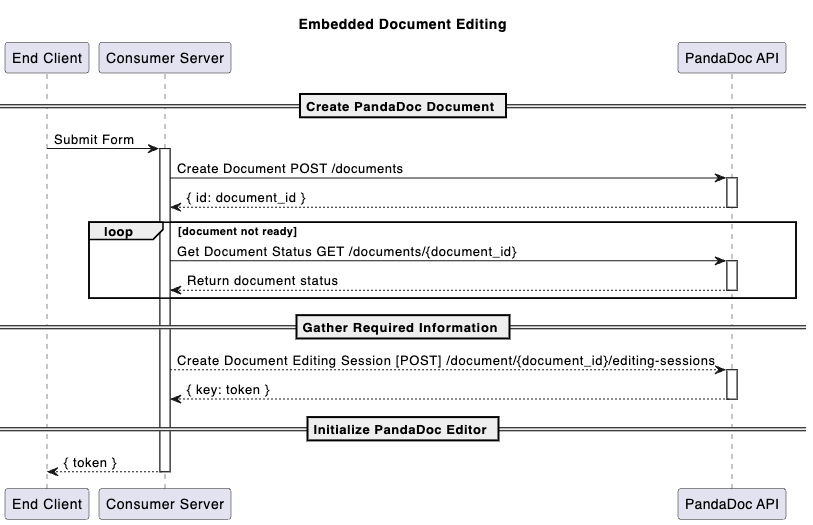
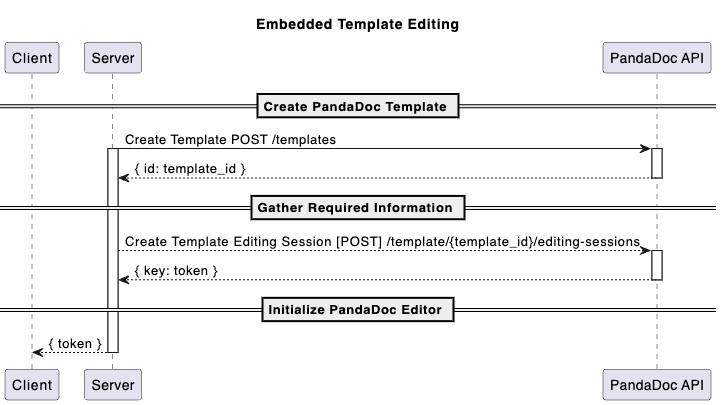
Step 1: Obtain an editing session token (E-Token)
Generate a short-lived editing session token using one of these endpoints:
- Create Template Editing Session -- for editing templates
- Create Document Editing Session -- for editing documents
Step 2: Install the editor package
The PandaDoc Embedded Editor is available as an npm package:
yarn add pandadoc-editorStep 3: Initialize and open the editor
import { Editor } from "pandadoc-editor";

const editor = new Editor(
    "editor-container",
    {
      fieldPlacementOnly: false,
      token: "", // E-Token is optional during initialization
    }
);

await editor.open({
    token: "your-e-token"
});
The editor loads with the document or template associated with the E-Token.
Step 4: Configure visible fields (optional)
Control which field types appear in the editor using the fields parameter:
await editor.open({
    token: "your-e-token",
    fields: {
        "signature": { visible: false },
        "stamp": { visible: false },
        "payment_details": { visible: false },
    },
});
Default field configuration
All fields are visible by default:
const defaultFieldConfig = {
    "checkbox": { visible: true },
    "dropdown": { visible: true },
    "date": { visible: true },
    "signature": { visible: true },
    "stamp": { visible: true },
    "initials": { visible: true },
    "payment_details": { visible: true },
    "collect_file": { visible: true },
    "radio_buttons": { visible: true },
};
Step 5: Configure visible blocks (optional)
Control which content blocks appear using the blocks parameter. Blocks are disabled by default -- pass fieldPlacementOnly: false to enable them.
await editor.open({
    token: "your-e-token",
    fieldPlacementOnly: false,
    blocks: {
        "pricingTable": { visible: true },
        "page-break": { visible: true },
        "quote": { visible: true },
    }
});
Default block configuration
All blocks are hidden by default:
const defaultBlockConfig = {
    "text": { visible: false },
    "image": { visible: false },
    "video": { visible: false },
    "table": { visible: false },
    "pricingTable": { visible: false },
    "page-break": { visible: false },
    "tableOfContents": { visible: false },
    "placeholder": { visible: false },
    "quote": { visible: false },
};
Flow diagrams
Document Embedded Editing flow
Template Embedded Editing flow
Related
- Understanding the Document Workflow Lifecycle -- how embedded editing fits the overall lifecycle
- How to Set Up Embedded Sending -- same PandaDoc Editor in field-placement-only mode
- How to Embed Document Signing -- embed the signing experience
- Embedded Editing/Signing Playground -- try it without an account
- pandadoc-editor npm package
Updated 6 months ago